Excel|2007|2003|Microsoft Excel|Formula|Function|Pivto Table|Excel Topics|Passwords|Hyperlink Excel Guru: spreadsheet
Showing posts with label spreadsheet. Show all posts

Tuesday, September 22, 2009

Excel : Protect a Cell in Excel 2003/Xp/2000/97

Also Learn How to Protect a cell in Excel 2007.
Question : How do I Protect a cell form being edited by others in Excel 2003/ XP/2000/97 ?
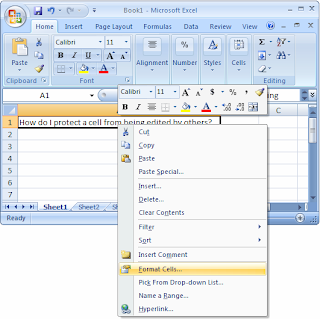
Answer : First, you'll need to up-protect all of the cells on your sheet. To do this, select all of the rows and columns in your sheet. Right -Click on then select " Format Cells" From the Popup Menu.


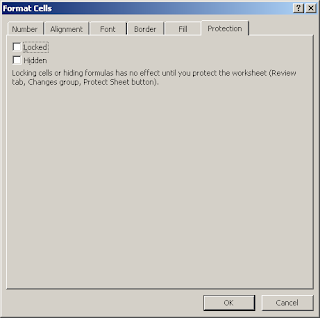
When the Format Cells Window appears, select the Protection tab. Uncheck the " Locked " Checkbox. Click on the OK Button.

Next, Select the cells that you wish to protect. Right - Click and then select "Format Cells" form the Pop up Menu.

When the Format Cells Windown appears, Select the Protection tab. Check the "Locked" Checkbox. Click the Ok Button.


For the Locking of the cells to take effect, you must also protect the worksheet. To do this, select protection and then " Protect Sheet" Under the Tool Menu.


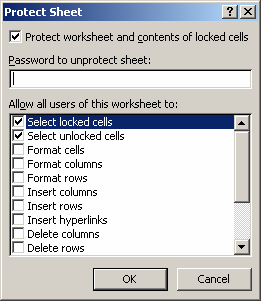
A "Protect Sheet" Window will appear. You may enter a password to protect the shee. The password is optional. click on the OK Button.

Excel : Protect A Cell in Excel 2007

Also Learn How to Protect a cell in Excel 2003/ Xp//2000/97.

Question : How do I Protect a cell form Being edited by others in Excel 2007 ?
Answer : First, you'll need to up-protect all of the cells on your sheet. to do this, select all of the rows and columns in your sheet. Right - Click on then select "Format Cells" from the popup Menu.


When the Format cells window appears, select the protection tab. Uncheck the " Locked" checkbox. Click on the Ok button.


Next, Select the Cells that you wish to protect. Right - Click and then select "Format Cells" From the popup Menu.
When the Format Cells window appears, select the Protection tab. Check the " Locked" Checkbox. click the OK Button.
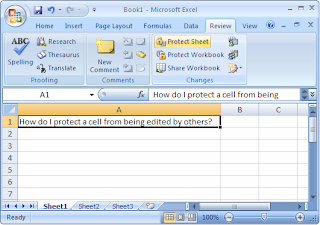
For the locking of the cells to take effect, you must also protect the worksheet. To do this, select the Review tab form the toolbar at the top of the screen. Then click on Protect sheet Button.


A "Protect Sheet" window will appear. you may enter a password to protect the sheet if you wish. The password is optional. Click on the OK Button.

Excel: Wrap Text in merged Cells in Excel 2007

Excel : Wrap Text in merged Cells in Excel 2007


Also See How to Wrap text in Merged cells in Excel 2003/Xp/2000/97.

Question : How do i Wrap Text in Merged Cells in Excel 2007 ?

Answer : Select the Merged cells that you wish to Wrap Text. Right - Click and then select "Format Cells" From the Popup menu.


When the Fromat Cells window appears, Select the Alignment Tab. check The "Wrap Text" Checkbox.


Now When you return to the Spreadsheet, you will need to manually adjust the height of the row that contains the merged cells. To do this, position your mouse pointer over the bottom of the row untill a double arrowed pointer appears. Then hold down the left mouse button and drag downward. Release the left mouse button when the row is the desired height.


Now When you view the contents of the merged cells, you will be able to see that the text is wrapping.